Go to
hablame.blog
and click the button for your computer (Mac, Windows or Linux).
Open the downloaded file and follow the installer. It's like
installing any other program: accept and you're done.
If a security warning appears the first time
("unidentified developer" on Mac, or SmartScreen on Windows), that's
normal for new apps and doesn't mean it's dangerous. On Mac: right-click
the app → Open → Open. On Windows:
More info → Run anyway. On Linux: give
the AppImage permission to run (right-click → Properties → Allow
executing as program). Only needed the first time.
2. Activate with your key
The first time you open Háblame, it asks for your
license key (something like
HABLAME-XXXX-XXXX). You got it when you bought — on screen
and by email.
Type it (or paste it) and press Activate. Done: it's
yours forever.
The key is checked only once, on activation. From then on Háblame works
offline. Only the key travels over that connection —
never your voice or your texts.
3. Pick the right language (important)
Háblame uses voice "models". The one you download determines which
languages it dictates well. In settings, go to
Models and download the one you need:
To dictate in Spanish (or mix languages): pick a
multilingual model — the ones that say "many languages"
next to the name (for example Whisper, Cohere Transcribe or Voxtral).
Those handle Spanish accents and ñ correctly.
Getting garbled text, or English when you speak Spanish?
Almost always it's because you have an English-only model selected.
Switch to a multilingual model in Models and, under
Settings → Language, set
Spanish instead of "automatic". Fixed instantly.
The model downloads once (a couple of minutes depending on your
connection) and then works offline.
Comparison of the models included out of the box
The precision and speed numbers are the ones the app itself uses (not
an opinion) — more languages usually means somewhat less precision and
speed because the model spreads its "attention" across more tongues.
Model
What it's for · Precision/Speed (out of 100) ·
Languages
Parakeet V3 recommended
The best balance for dictating in Spanish —
precision 88/100, speed 79/100. 25 European languages (Spanish
included), auto-detects the language. No live streaming and no
translation. This is the one Háblame ships with active by
default.
Nemotron Streaming 3.5
Writes word by word as you speak (streaming),
instead of waiting for you to release the keys — it feels more
"live". Precision 82/100, speed 84/100. 28 languages including
Spanish. In exchange for that live effect, it's somewhat less
precise than Parakeet V3.
Parakeet Unified EN 0.6B
The highest precision of the six (90/100) and
also live streaming — but English only. Use it
only if you dictate in English every day.
Canary 180M Flash
The fastest one (speed 98/100, precision
88/100) and the only one of the six that
translates what you say into English on the
fly. But only 4 languages (English, German, Spanish, French) and
it doesn't auto-detect the language — you set it yourself under
Settings → Language.
Whisper Medium
Covers 99 languages (handy for rare languages
the others don't include) with translation and automatic
detection, but it's noticeably slower — speed 42/100, precision
84/100.
Whisper Turbo legacy
The classic "all-terrain" option: 100 languages, translates,
auto-detects the language. Precision 87/100, but the slowest of
the six (speed 35/100) — short sentences pay a fixed toll of a
few seconds. Good if you need maximum language coverage and
don't mind the wait.
Which one to pick? If you dictate in Spanish every
day, Parakeet V3 (the default) is the best choice —
almost as precise as Whisper Turbo but many times faster. Try
Nemotron Streaming 3.5 if you like watching the text
appear as you speak. Switch to Whisper Medium/Turbo
only if you need a language the others don't cover, or want automatic
translation to English (in that case,
Canary 180M Flash is faster if your language is among
the 4 it covers).
4. Dictate (the gesture)
Put the cursor wherever you want to write: an email, Word, WhatsApp
Web, anything.
Hold the Háblame shortcut: on Mac,
⌥ Option + space; on
Windows and Linux, Ctrl +
space. You'll see the recording indicator.
Speak naturally, without releasing the keys.
Release the keys — and the text appears typed where your cursor was.
Changed your mind halfway? Press Esc and it cancels without
writing anything. You can change the key combination in Háblame's
settings if you prefer.
5. Ask Háblame — and get an answer back
new
Háblame no longer just writes down what you say: it can also
answer you. Speak a question to it and it replies —
in writing wherever your cursor is, and on Mac also
out loud.
Put the cursor where you want the answer.
Hold ⌥ Option + P (on Windows and Linux,
Ctrl + Alt + P) and
ask your question out loud.
Release the keys. Háblame thinks for a second, pastes the answer and
reads it out loud (on Mac).
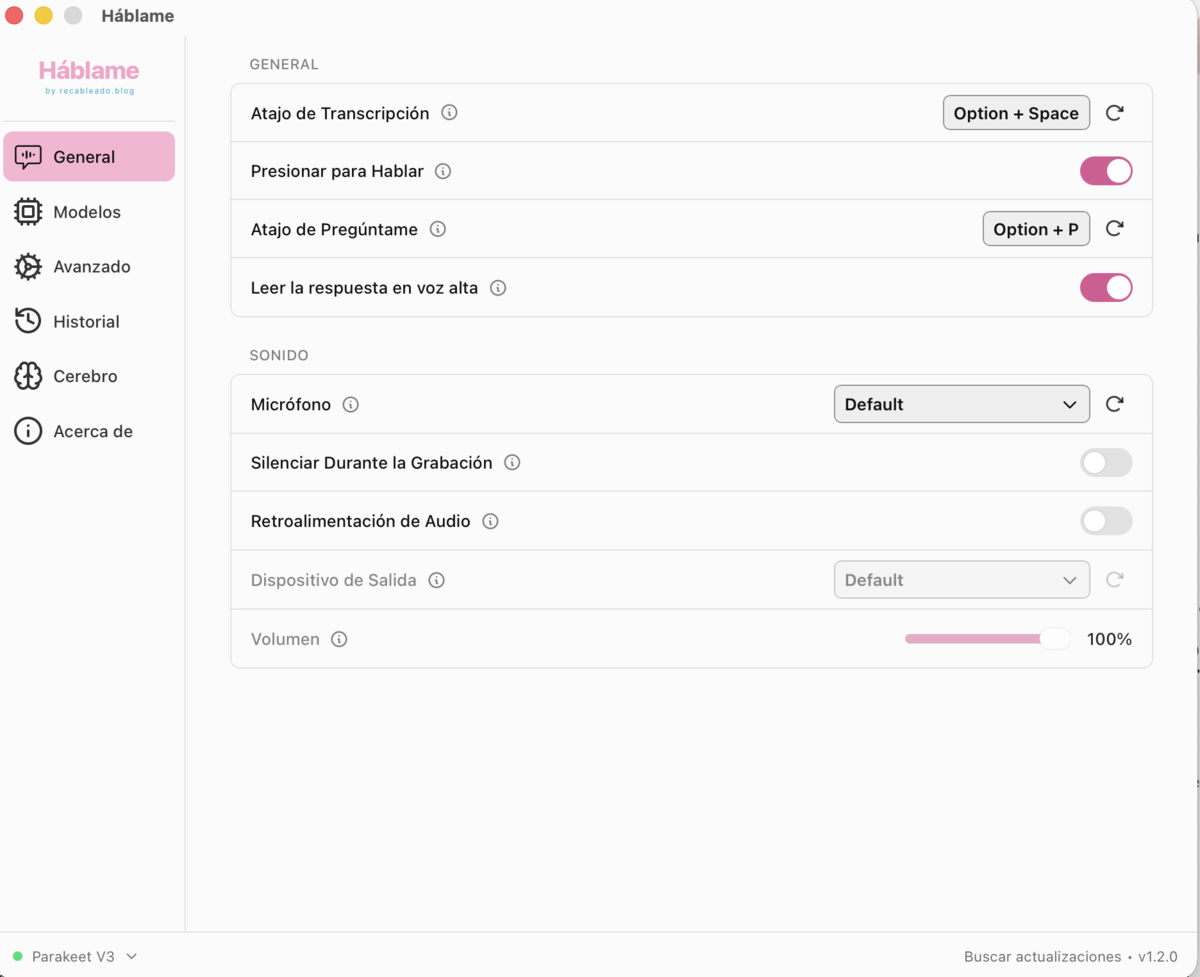
Settings → General: the Ask shortcut and the "Read the answer out
loud" toggle (Mac).
It answers in your language and uses what you've
dictated before as context (your Brain),
so its answers know you. Change the shortcut and whether it reads out
loud in Settings → General.
Which "brain" does it think with? You choose — and by default
it's private.
On Mac with Apple Silicon and Apple Intelligence,
it thinks with the Mac's own AI: free, private,
with nothing leaving the computer. Nothing to configure.
Prefer another model (ChatGPT, Claude, Gemini, some Chinese AI…)?
Enable it under Settings → Advanced → Post Processing
and pick a provider with your own key. Only then
does the question travel to the provider you chose.
If none is available, Háblame tells you with a short notice —
it never errors out.
6. Custom words — names, brands and jargon
key
No dictation engine in the world knows your surname, your company name
or that technical word you use every day — so it writes them
as they sound: "Scibasku" comes out as "Eskibascu" or
"Esquivascu". Háblame solves it with a list of your own.
Go to Settings → Custom words.
Add the word correctly spelled (for example
Scibasku). One per line.
Done: whenever dictation writes something similar, Háblame corrects it
to your version automatically.
If a heavily distorted variant still slips through,
raise the Sensitivity slider. More sensitivity = it
corrects even when dictation drifts further from the word. If you notice
it starts "over-correcting" normal words, lower it a little. The factory
setting is already calibrated for most cases.
Trick for domains and joined-up words: if you dictate
"Scibasku dot com" in one go, say it separately — "Scibasku" then "dot
com" — or let the AI polish finish
the job. And for spoken punctuation ("comma", "period", "new line"),
enable it from the Polish too.
In the same place you can define
filler words to remove (your "um", "you know", "like…")
so they never get written.
7. AI polish (optional but powerful)
Besides transcribing, Háblame can clean up your text:
remove filler words, fix punctuation, turn "twenty-five" into "25" and
tidy the sentence. Turn it on with the Polish switch in
settings (off by default).
On Mac with Apple Silicon (M1 or later) with Apple
Intelligence enabled, the polish uses the
Mac's own AI — free and without your text leaving your
computer. On Windows and Linux, or if you prefer,
connect another engine (Anthropic, OpenAI, Ollama…) with your own key.
The polish has "instructions" you can edit. That's
where you teach it the rules of your world. For example, add a line:
"The brand is always spelled exactly Scibasku (e.g.
Viajes Scibasku)." That way it fixes the name no matter how it was heard — the
ultimate safety net for invented words.
8. Your Brain — everything you dictate, yours and searchable
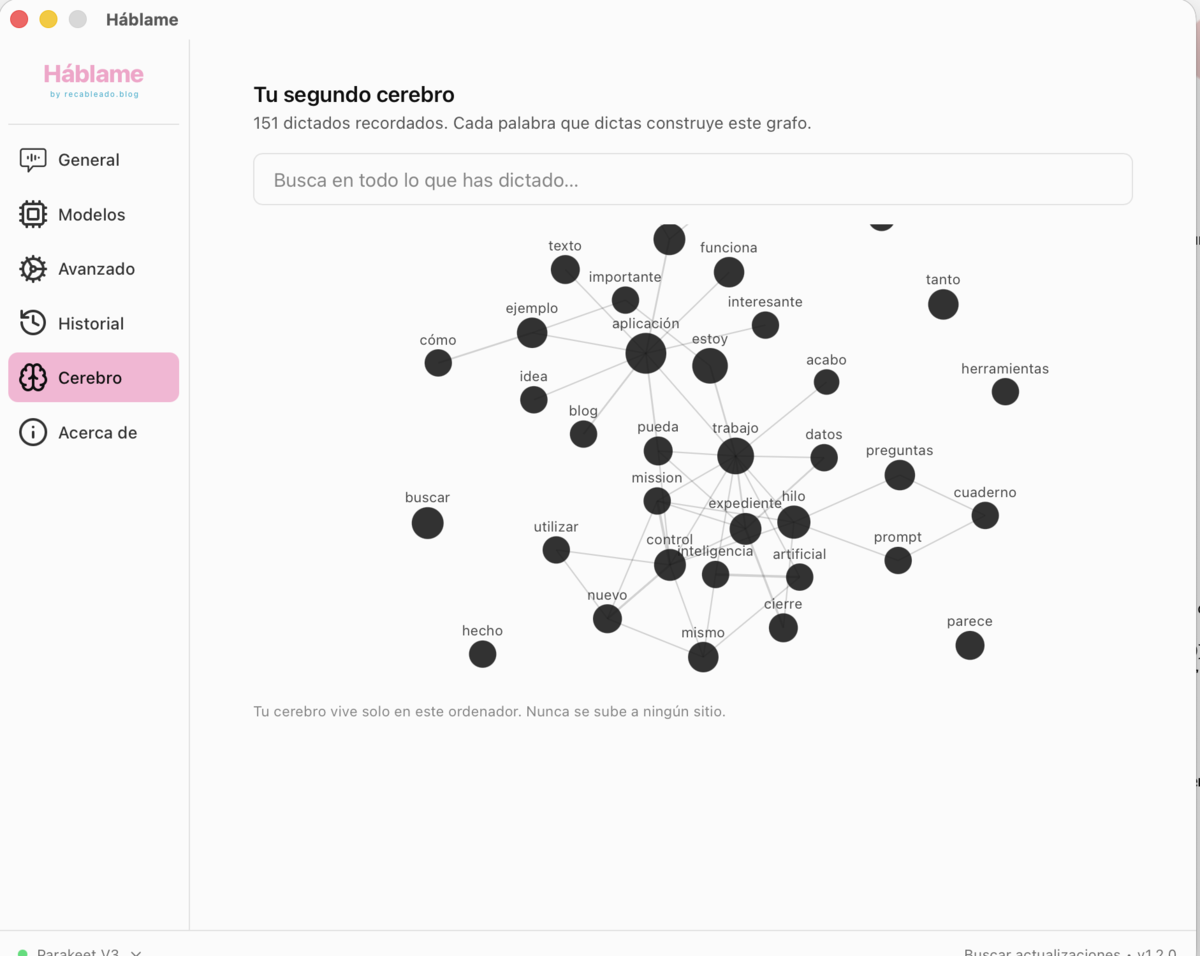
Every sentence you dictate is saved to your Brain: a
file of everything you've said, which you can search
instantly and view as a graph of your words. It's also what gives
context to Ask Háblame so it knows
you.
Settings → Brain: search everything you've dictated and view it as a
graph. It lives only on your computer.
Private by design. The Brain and the History live
only on your computer — they never get uploaded
anywhere. Under Settings → History you decide how
much gets kept.
9. Every setting, tuned to you
Háblame has plenty of knobs to adapt it to how you work. You don't need
to touch them all — the steps above already work great. But if you want
to squeeze it, here's everything. Items marked
advanced only if you feel like
fine-tuning.
🎤 Dictation & language
Dictation language
"Automatic" detects the language; set it to
Spanish if you always speak Spanish and want zero
surprises.
Translate to English
You speak your language and Háblame writes English. Off by
default.
Model
Multilingual for Spanish; English-only ones are faster but
English-only. (See step 3.)
Voice detection (VAD)
Trims silences for better transcription. Leave it on unless it
causes trouble. advanced
⌨️ Gesture & shortcuts
Key combination
Change the recording shortcut to whatever feels comfortable.
Hold vs. toggle
By default you record while holding. You can
switch to press once to start and again to stop.
Cancel
Esc during recording discards without writing anything.
Keyboard engine
If the shortcut doesn't respond on your system, try the
alternative engine. advanced
🔊 Microphone & noise
Microphone
Choose which one to use if you have several.
Clamshell microphone
On a Mac with an external monitor and the laptop closed, pick a
different mic for that case.
advanced
Always-on microphone
Reduces the delay when you start speaking, in exchange for keeping
the mic ready. advanced
Mute while recording
Lowers the computer's sound while you dictate so it doesn't leak
into the recording.
Recording buffer
If it clips the start of a sentence, add a few extra milliseconds.
advanced
📝 How the text is written
Paste method
How Háblame "types" the result (Ctrl+V, direct typing, etc.). If
it looks wrong or incomplete in some app, switch method.
advanced
Clipboard
Choose whether Háblame also leaves the text in your clipboard or
doesn't touch what you had copied.
Trailing space
Adds a space after each dictation so you can chain sentences
without them sticking together.
Auto-submit
Great for chats: on release, besides typing, it presses
Enter (or Ctrl/Cmd+Enter) and sends the message for
you.
Paste delay
If an app is slow and text gets lost, raise the delay.
advanced
Typing tool (Linux)
wtype, kwtype, dotool… depending on your environment. "Auto"
usually gets it right.
advanced
🎨 Appearance & startup
Theme
Light, dark or the system's.
App language
The language of Háblame's menus (different from the language you
dictate).
Recording indicator
Show it full, minimal or hide it. And choose whether it appears at
the top or bottom of the screen.
Sounds
Enable/disable the start and end recording cues and adjust their
volume.
Open at startup / Start hidden / Tray icon
Have Háblame launch with the computer, with no window, living in
the menu bar.
Free memory after inactivity
Unloads the model from memory after a while (instantly, 2/5/10/15
min, 1 h… or never). "Never" = faster; a short time = frees RAM.
advanced
🕓 History & privacy
Dictation history
How many recent transcriptions to keep (to copy them again).
Keep audio recordings
How long to keep the audio: never, per the limit, 3 days, 2 weeks
or 3 months. Everything stays on your computer.
Data folder
Where everything lives. You can open it to back up or clean.
advanced
Updates & what's new
Check for new versions automatically and show what's new on
update.
⚙️ Performance advanced
Acceleration
Use your machine's GPU (Metal on Mac, Vulkan on Windows/Linux) to
go faster, or force CPU if something fails.
Debug mode
Cmd+Shift+D (Mac) or Ctrl+Shift+D. Detailed
logs for when you ask for help.
Experimental options
Features in testing. Use them only if you know what you're looking
for.
Frequently asked questions
It writes nothing when I dictate
Almost always a permission. On Mac, go to System
Settings → Privacy & Security → Accessibility and
enable Háblame (that's what lets it "type" for you); also check that
the Microphone is allowed. On
Windows no special permission is usually needed: if
it doesn't write, close and reopen Háblame. On Linux,
under Wayland the auto-typing may need desktop-specific tweaks (with
X11 it works directly).
It spells my name or company wrong
Add them under Settings → Custom words (step 5). If
it still slips, raise the Sensitivity or enable the
AI polish with the brand in its instructions.
Does it work offline?
Yes. Once activated and with the model downloaded, Háblame dictates
without a connection. Everything happens inside your computer.
Is my voice uploaded anywhere?
No. Neither your voice nor your texts leave the computer. That's the
difference from cloud dictation apps. The only thing checked online is
the key, on activation. (If you connect an external polish engine with
your API key, that text does travel to that provider; the Apple polish
is local.)
Can I use it on mobile?
No. Háblame is for computers (Mac, Windows and Linux). On mobile, the
iPhone's or Android's own keyboard already has a dictation button that
works fine for the basics.
Does the key work on several computers?
The key is personal. If you need to use it on more than one machine,
write to us and we'll sort it out.